Web3Auth v10 whitelabeling migration guide
This guide focuses specifically on migrating whitelabeling and UI customization configurations from Web3Auth v8 to v10. This is a supplementary guide to the main v8 to v10 migration guide.
Overview
Whitelabeling and UI customization have been significantly streamlined in v10, focusing on dashboard configurations and a more direct approach to modal customization.
Migration steps
1. Branding (v8 uiConfig): Moves to dashboard
- Most general branding settings previously in the client-side
uiConfig(for example,appName,logoLight,logoDark,themecolors) are now primarily configured on the Embedded Wallets dashboard.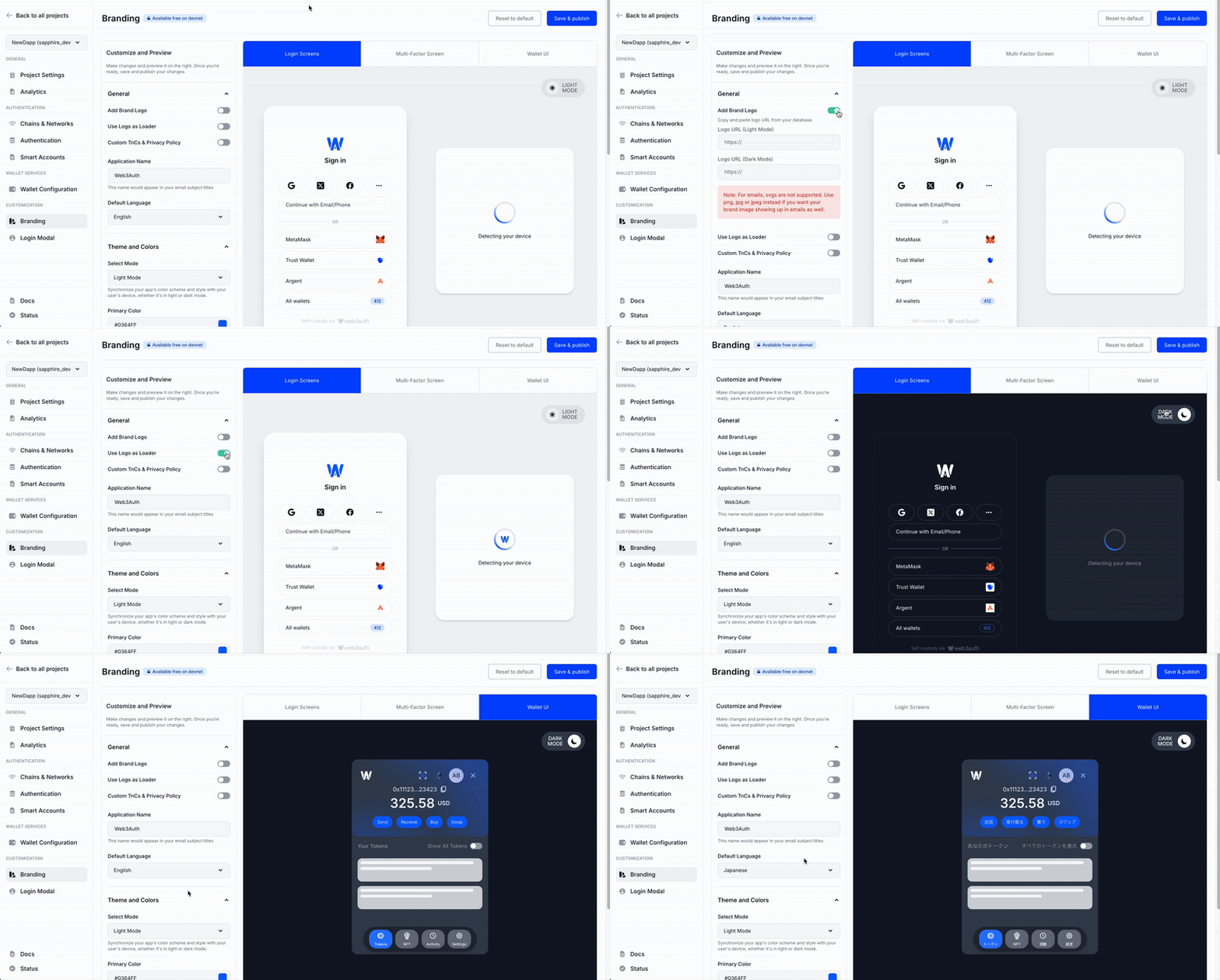
- Action: Transfer v8
uiConfigbranding to the dashboard. Client-sideuiConfigin v10Web3AuthOptionsis minimal, for overrides not covered by the dashboard.
2. Modal login method display (v8 modalConfig in initModal()): New structure in Web3AuthOptions
- Previously (v8): Customizing which login methods appear in the modal (and their appearance/order) was done via
modalConfigininitModal()in v8. - Now (v10): This moves to
modalConfigwithinWeb3AuthOptions(at SDK instantiation). The structure is new, utilizingconnectors(for example,WALLET_CONNECTORS.AUTHfor social/email,WALLET_CONNECTORS.WALLETfor external wallets) and aloginMethodsobject within each connector. - Each login method (for example,
google,email_passwordless,metamask) is an object conforming toLoginMethodConfig, allowing you to setname,showOnModal, `authConnectionId (for custom auth), for example.// v10: modalConfig in Web3AuthOptions
const web3AuthOptions: Web3AuthOptions = {
// ... other options
modalConfig: {
connectors: {
[WALLET_CONNECTORS.AUTH]: {
/* ... config for social/email ... */
},
[WALLET_CONNECTORS.WALLET]: {
/* ... config for external wallets ... */
},
},
},
} - Action: Rebuild your modal display logic using the new
modalConfigstructure inWeb3AuthOptions. Refer to the v10LoginMethodConfigtype definition for all properties. Deprecated v8WALLET_ADAPTERSenum is replaced byWALLET_CONNECTORSand specific login method keys.
3. Auth adapter whitelabeling in v8: no longer supported
- In v8,
whiteLabelsettings in an@web3auth/openlogin-adapterinstance could customize intermediate auth screens (for example, social login pop-ups). - In v10, passing this
whiteLabelconfiguration is no longer supported since there is no way to configure auth adapter settings. - Action: Remove v8
OpenloginAdapterwhiteLabelconfigurations. Ensure your dashboard branding is comprehensive.
Summary
This shift centralizes UI control on the dashboard and simplifies client-side SDK configuration for whitelabeling. The new approach provides better consistency across applications and easier maintenance of branding configurations.
Next steps
Return to the main v8 to v10 migration guide to continue with other migration aspects like Smart Account functionality, custom authentication, and MFA configurations.